Category: Train automation

Automatic LEGO® train decoupling solutions

Post reviewing the different types of automatic decoupling solutions

In order to have an automatic, “no-touch” railroad layout, an automatic decoupler is high on my wish list. I visualize a shunting yard with a ladder, where I can rearrange the consist of freight trains, and have a somewhat prototypical operation.

There are in short 4 types of decouplers that I am aware of:

1 – Decoupler under/between the rails

A beam stretches upwards and catches the undercarriage of the wagon. These solutions rely on the inertia/speed or at least the wheel grip of the locomotive, to overcome the pulling force of the magnets.

  • Pro: The solution can be made very small and compact
  • Con: It will always decouple by the weakest magnet link – so it is mainly useful four decoupling a single wagon or a complete set of i.e. passenger cars.

The solutions can be:

  • Passive: Always decouple when running the train forward over the decoupler. No motorization required!
  • Active: The beam can be raised/lowered, allowing for running on the track in both directions, and actively manage the decoupling.

Examples:

2 – Sidebeams + pushing wagons/magnets from each other

This solution drives a beam in between the wagons you want to decouple, and actively pushes them away from each other, to overcome the magnetic pulling force.

  • Pro: You can decouple anywhere in a trains consist, making it very flexible and more prototypical.
  • Con: Depending on the motors, the build can take up quite some space. The stopping location of the train must be very precise.

As in the first video in examples below, it might be possible to use only one motor to separate the magnets. The video features trains with the old style open magnetic couplers. I will try to check whether it also works with the new style magnets, or if I have to stick with a design, where I am actively pushing the wagons apart. More about that in upcoming post.

Examples:

3 – Blocking wheels of wagons / 4Dbrix

Another way of decoupling is to “lock” the wheels of the wagon, and drive the locomotive away, thereby decoupling. Intuitively, this would give the same problems as with solution 1: The wagons will decouple at the weakest link in the consist. The 3rd party manufacturer, 4Dbrix, however claims that this is not the case.

  • Pro: The smallest footprint on the reviewed solutions.
  • Con: May decouple only at the weakest link of the consist. It is NOT easily operable with Mindstorms, but instead operated by the free nControl PC software by 4Dbrix.

Link to product: https://www.4dbrix.com/products/train/2-04-017-decoupler/

4 – Original LEGO® 12v decoupler

LEGO® made a decoupler for the 12v train era back in the 1980s. It is difficult to get your hands on, and from what I can see from forums etc., it is not 100% reliable.

An idea for the future could be to build a similar solution, where the twisting mechanism is raised up between the tracks.

See a review here https://www.youtube.com/watch?v=EAeQRgs6qCU

Automatic LEGO® Container Yard – Post 1: Grabbing the container

First thoughts on an automatic container yard, and a container grab mechanism

As a part of my train layout, I have been thinking about a fully automated container yard – of course controlled by the LEGO® EV3 Mindstorm. My idea: A train comes in, the gantry lifts the container of the wagon, identifies the container, and place it on an empty spot in the container yard.

It sound simple – but it’s really not. The challenges are:

  • XYZ: The gantry must be able to move parallel and perpendicular to the track (X & Y) to move to the right location, and up/down (Z), to place/pickup container from the yard or a wagon.
  • Precise: The mechanism needs to be very precise, else there will be a need for adding many sensors for aligning etc. With millimeter precision, it has to place the container at an exact location, stored this location in a database, and be able to return to that location for picking up – only relying on the XYZ coordinates of the container location.
  • Identifying containers: My initial idea is to identify containers using a color-“barcode”. More about this in another post.
  • Grabbing container: The gantry needs a mechanism to grab a container, with 100% reliability, and without allowing the container to rotate. If the container rotates, it will be nearly impossible to operate without adding active aligning.

I started out by investigating on the grab mechanism. First attempt was to use the linear actuator, and pivoting fingers, like in the LEGO® set 42006. However, this design was a bit too wobbly, and the grab mechanism tended to rotate a bit, due to the axle rotation into the actuator.

The “test container” has a 1×1 Studded Technic Brick in each corner, where the grab mechanism can lock in:

Instead of using the actuator, I tried to go for a design, where hooks in each corner pivots very closely to the container. Additionally, I added some passive guides, to align the grab mechanism into place.

I am very happy with the result! It is much sturdier and very reliable! (I haven’t tested it a 100 times yet though…). See the the video below.

Motorized LEGO® train switch with Mindstorms

An example of motorizing a LEGO® train switch (turnout), and controlling it from Mindstorms

A goal of mine is to – someday – create a more or less automated running LEGO® railroad layout. One of the steps towards that is to operate the switches by motors, and then control the motors by programming on the EV3.

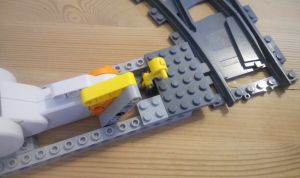
Inspired by a video (which I can’t find again and credit properly), I simplified, and made the shown design.

Two 16 long studded technic bricks keeps the motor in place, and is attached to the switch with normal bricks. This can be done in many ways, and probably also more compact and sturdier than this design.

A 5 long liftarm is attached to the motor, and 2 x thin 4 long liftarms are connecting to the switch. The thin liftarms has an axle hole at the ends, which can hold the tap of the lever.

This was the easy part. The programming is also not difficult – it is basically just turning a motor a certain number of degrees. The tuning of the degrees needed as well as the speed takes some time, but I found an angle of 43 and speed of 50 works well. See my code at the end of this post.

Functional motorized LEGO® train switch, operated by Mindstorms EV3.

Videos of other builds using Mindstorms to control the switches:

My code example used in the video:

#!/usr/bin/env python3
from ev3dev.ev3 import *
from time import *

# Connect motors and sensors
ts = TouchSensor("in1")
lm = LargeMotor("outA")

# Variables for tuning the switch.
# Make sure that the polarity of the motor is right.
# Test it before attaching the motor to the switch.
degrees = -43
speed = 50

# Make sure that the switch is manually put to "straight" position
# before running the program. Below resets the angle counter
# of the motor to zero.
lm.position = 0

def main():
    # direction of the switch: 0 = straight, 1 = turn/diverting
    switch_state = 0
    while True: # Loop forever - press back button on EV3 to stop.
        if ts.value() >= 1:   # If touchsensor pressed.
            if switch_state == 0:
                lm.run_to_abs_pos(position_sp=degrees, speed_sp=speed, stop_action="brake")
                Sound.speak("Turn")
                sleep(3)
                switch_state = 1
            elif switch_state == 1:
                lm.run_to_abs_pos(position_sp=0, speed_sp=speed, stop_action="brake")
                Sound.speak("Straight")
                sleep(3)
                switch_state = 0

if __name__ == '__main__':
    main()